
函数式编程stream+Lambda

Stream流在代码中看起来太悠亚了
带薪学习就是一个字:爽!!!

1. Lambda表达式之初体验

示例1:

创建一个线程:

public static void main(String[] args) {
new Thread(new Runnable() {
@Override
public void run() {
System.out.println("hello world");
}
}).start();
}

什么时候可以使用lamdba进行简化呢??

  • 如果这个匿名内部类是一个接口的匿名内部类,并且这个匿名内部类只有一个抽象方法需要重写,那么我们就可以进行简化
  • lamdba不关心你是哪个对象,包括方法名,他只关注方法体和方法参数

简化为:

public static void main(String[] args) {
new Thread(()-> System.out.println("hello world")).start();
}

示例2:

现有方法定义如下,其中IntBinaryOperator是一个接口。先使用匿名内部类的写法调用该方法。

public static int calculateNum(IntBinaryOperator operator){
int a=10;
int b=20;
return operator.applyAsInt(a,b);
}

public static void main(String[] args) {
int result = calculateNum(new IntBinaryOperator() {
@Override
public int applyAsInt(int left, int right) {
return left+right;
}
});

System.out.println(result);
}

简化为

public static void main(String[] args) {
int result = calculateNum(( int left,int right)->{
return left+right;
});

System.out.println(result);
}

还可以进一步转化

int result = calculateNum((left, right) -> left + right);
  • 省略参数类型(编译器可通过 IntBinaryOperator 推断出参数为 int
  • 省略 return 和大括号(单行表达式可简化)

甚至可以用方法引用替代(因为 Integer.sum(int a, int b) 方法的参数和返回值与 IntBinaryOperator 匹配):

int result = calculateNum(Integer::sum); // 效果完全相同,返回30

方法引用:

方法引用的本质是 “简化 Lambda 表达式”。当 Lambda 表达式的逻辑就是调用某个已存在的方法时,就可以用方法引用替代

方法引用 Integer::sum 可以替代函数式接口的实现,但要求该函数式接口的抽象方法必须满足:

  • 参数数量:2 个
  • 参数类型:可兼容 int(比如 int 或自动装箱的 Integer
  • 返回值类型:可兼容 int(比如 int 或自动装箱的 Integer

那么上方示例2就可以兼容方法引用,直接使用即可

示例3

打印1-10的偶数

public static void printNum(IntPredicate predicate){
int[] arr ={1,2,3,4,5,6,7,8,9,10};
for (int i:arr){
if(predicate.test(i)){
System.out.println(i);
}
}
}
public static void main(String[] args) {

printNum(new IntPredicate() {
@Override
public boolean test(int value) {
return value%2==0;
}
});

}

简化为

public static void main(String[] args) {
printNum(value -> value%2==0);
}

代码一行可以省略大括号和return

示例4

public static <R> R typeConver(Function<String,R> function){
String str="123";
return function.apply(str);
}
public static void main(String[] args) {

Integer i = typeConver(new Function<String, Integer>() {
@Override
public Integer apply(String str) {
return Integer.valueOf(str);
}
});
System.out.println(i);

}

转化为

public static <R> R typeConver(Function<String,R> function){
String str="123";
return function.apply(str);
}
public static void main(String[] args) {

Integer i = typeConver((String str)-> {
return Integer.valueOf(str);
});
System.out.println(i);

}

2. Stream流

一定要把Stream想象成流水线

2.1 Stream流之初体验

需求1:打印所有年龄小于18的作家的名字,并且注意去重

List<Author> authors = getAuthors();
authors.stream()
.distinct()
.filter(author -> author.getAge() < 18)
.forEach(author -> System.out.println(author.getName()));

2.2 创建流

单列集合

语法:集合对象.Stream()

List<Author> authors = getAuthors();
authors.stream()
... ...

数组

语法: 使用Arrays.stream()方法

/**
* 方法一:使用Arrays.stream()方法
*/

String[] array = {"x", "y", "z"};
Stream<String> arrayStream = Arrays.stream(array);
// 也可指定数组区间
Stream<String> arrayPartialStream = Arrays.stream(array, 0, 2);


/**
* 方法2: 通过Stream.of()方法(将数组转换为流,本质是基于数组创建)
*/
Stream<String> arrayStream2 = Stream.of(array); // 注意:此时流的元素是数组本身,若要元素是数组中的元素,需用Arrays.stream

Map

Map 没有直接的stream()方法,需通过其键集(keySet)值集(values)键值对集合(entrySet)来创建 Stream 流。

Map<String, Integer> map = new HashMap<>();
map.put("蜡笔小新",19);
map.put("黑子",17);
map. put("日向翔阳",16);
Set<Map.Entry<String,Integer>> entrySet = map. entrySet();
Stream<Map. Entry<String, Integer>> stream = entrySet.stream();

2.4 中间操作

filter

可以对流中的元素进行过滤,符合过滤条件的才能继续留在流中

例如:打印所有姓名长度大于1的作家姓名

List<Author> authors = getAuthorso;
authors.stream()
.filter (author -> author.getName().1ength()>1)
.forEach(author -> system.out.print1n(author . getName());
Map

可以把对流中的元素进行计算或转换

例如:打印所有作家名字

List<Author> authors = getAuthors(;
authors
.stream ()
.map(author -> author.getName ())
.forEach(name->System.out.print1n(name));
distinct

去重

sorted

排序

class Author {
private String name;
private int age;
// 构造器、getter等省略
}

List<Author> authors = Arrays.asList(
new Author("张三", 25),
new Author("李四", 20),
new Author("王五", 30)
);

// 按年龄升序排序(从小到大)
authors.stream()
.sorted(Comparator.comparingInt(Author::getAge)) // 用方法引用简化Comparator
.forEach(author -> System.out.println(author.getName() + ":" + author.getAge()));
// 输出:李四:20、张三:25、王五:30

// 按年龄降序排序(从大到小):在比较器后加reversed()
authors.stream()
.sorted(Comparator.comparingInt(Author::getAge).reversed())
.forEach(author -> System.out.println(author.getName() + ":" + author.getAge()));
// 输出:王五:30、张三:25、李四:20
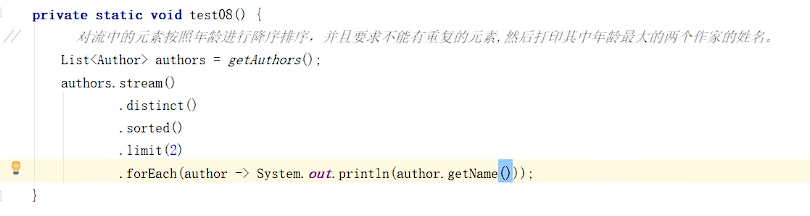
limit

可以设置流的最大长度

image-20251027155119112

skip

跳过前n个元素,返回剩下的元素

flatMap

在 Stream 流中,flatMap是一个中间操作,用于将 “流中的每个元素转换为一个新的流”,然后将所有这些新流 “扁平合并” 为一个单一的流。它的核心作用是解决 “流中包含流” 的嵌套结构,将多层流 “拍平” 为单层流。

map只能把一个对象转换成另一个对象来作为流中的元素。而flatMap可以把一个对象转换成多个对象作为流中的元素。

打印所有书籍名称,并且去重

// 2. 流式操作:扁平化提取所有书籍并去重,最后打印书籍名称
authors.stream()
// 扁平化:将每个作者的书籍列表转换为书籍流
.flatMap(author -> author.getBooks().stream())
// 去重:根据Book的equals和hashCode方法去重
.distinct()
// 遍历打印书籍名称
.forEach(book -> System.out.println(book.getName()));

2.5 终结操作

forEach

对流中的元素进行遍历操作,我们通过传入的参数去指定对遍历到的元素进行什么具体操作。

// 收集去重后的姓名为列表
List<String> distinctAuthorNames = authors.stream()
.map(Author::getName) // 方法引用简化写法,等价于author -> author.getName()
.distinct()
.toList(); // Java 16+ 新特性,替代collect(Collectors.toList())

// 遍历打印列表
distinctAuthorNames.forEach(System.out::println);
Count
// 统计所有作者的去重书籍总数
long count = authors.stream() // 转换为Author流
.flatMap(author -> author.getBooks().stream()) // 扁平化为Book流
.distinct() // 对书籍去重(基于Book的equals和hashCode)
.count(); // 统计去重后的书籍数量

System.out.println(count); // 打印统计
min&max
List<Author> authors = getAuthors();
Optional<Integer> max = authors.stream()
.flatMap(author -> author.getBooks().stream())
.map(book -> book.getScore())
.max((score1, score2) -> score1 - score2);

System.out.println(max.get());
collect

把当前的流转化为一个List集合

// 1. 获取作者列表
List<Author> authors = getAuthors();

// 2. 流式操作:提取作者姓名并收集为列表
List<String> nameList = authors.stream()
.map(author -> author.getName()) // 映射:Author对象转姓名字符串
.collect(Collectors.toList()); // 收集:将流转换为List<String>

// 3. 打印姓名列表
System.out.println(nameList);

获取所有书名的Set集合

Set<String> bookNames = authors.stream()
.flatMap(author -> author.getBooks().stream())
.map(Book::getName) // 提取书名
.collect(Collectors.toSet());

获取一个Map集合,map的key为作者名,value为List\

List<Author> authorsList = getAuthors();
Map<String, List<Book>> map = authorList.stream()
.collect(Collectors.toMap(
author -> author.getName(),
author -> author.getBooks()
));

System.out.println(map);
查找与匹配

anyMatch只要有就匹配

// 判断是否有年龄在29以上的作家
List<Author> authors = getAuthors();
boolean flag = authors.stream()
.anyMatch(author -> author.getAge() > 29);
System.out.println(flag);

allMatch:所有的都匹配

noneMatch: 都不匹配

findFirst:获取流中第一个元素

private static void test22() {
// 获取一个年龄最小的作家,并输出他的姓名。
List<Author> authors = getAuthors();
Optional<Author> first = authors.stream()
.sorted((o1, o2) -> o1.getAge() - o2.getAge())
.findFirst();

first.ifPresent(author -> System.out.println(author.getName()));
}
  • sorted((o1, o2) -> o1.getAge() - o2.getAge()):按作者年龄升序排序(年龄小的在前)。
  • findFirst():获取排序后流中的第一个元素(即年龄最小的作者),返回Optional<Author>类型以避免空指针风险。
  • ifPresent(author -> System.out.println(author.getName())):若存在该作者(非空),则打印其姓名。
reduce 归并
  • 对流中的数据按照你制定的计算方式计算出一个结果。

  • reduce 的作用是把 Stream 中的元素给组合起来,我们可以传入一个初始值,它会按照我们的计算方式依次拿流中的元素和在初始化值的基础上进行计算,计算结果再和后面的元素计算。

  • 他内部的计算方式如下:

    T result = identity;
    for (T element : this stream)
    result = accumulator.apply(result, element)
    return result;
  • 其中 identity 就是我们可以通过方法参数传入的初始值,accumulator 的 apply 具体进行什么计算也是我们通过方法参数来确定的。

案例1:使用reduce求所有作者年龄的和

// 使用reduce求所有作者年龄的和
List<Author> authors = getAuthors();
Integer sum = authors.stream()
.distinct()
.map(author -> author.getAge())
.reduce(0, (result, element) -> result + element);

System.out.println(sum);

3.Optional

我们在编写代码的时候出现最多的就是空指针异常。所以在很多情况下我们需要做各种非空的判断。例如:

Author author = getAuthor();
if(author!=null){
System.out.println(author.getName());
}

尤其是对象中的属性还是一个对象的情况下。这种判断会更多。而过多的判断语句会让我们的代码显得臃肿不堪。所以在 JDK8 中引入了 Optional,养成使用 Optional 的习惯后你可以写出更优雅的代码来避免空指针异常。并且在很多函数式编程相关的 API 中也都用到了 Optional,如果不会使用 Optional 也会对函数式编程的学习造成影响。

3.1 创建Optional对象

Optional 就好像是包装类,可以把我们的具体数据封装到 Optional 对象内部。然后我们去使用 Optional 中封装好的方法操作封装进去的数据就可以非常优雅的避免空指针异常。

我们一般使用 Optional 的静态方法 ofNullable 来把数据封装成一个 Optional 对象。无论传入的参数是否为 null 都不会出现问题。

Author author = getAuthor();
Optional<Author> authorOptional = Optional.ofNullable(author);

你可能会觉得还要加一行代码来封装数据比较麻烦。但是如果改造下 getAuthor 方法,让其的返回值就是封装好的 Optional 的话,我们在使用时就会方便很多。

而且在实际开发中我们的数据很多是从数据库获取的。Mybatis 从 3.5 版本开始已经支持 Optional 了。我们可以直接把 dao 方法的返回值类型定义成 Optional 类型,MyBatis 会自己把数据封装成 Optional 对象返回。封装的过程也不需要我们自己操作。

如果你确定一个对象不是空的则可以使用 Optional 的静态方法 of 来把数据封装成 Optional 对象。

Author author = new Author();
Optional<Author> authorOptional = Optional.of(author);

但是一定要注意,如果使用 of 的时候传入的参数必须不为 null.

3.2 安全消费值

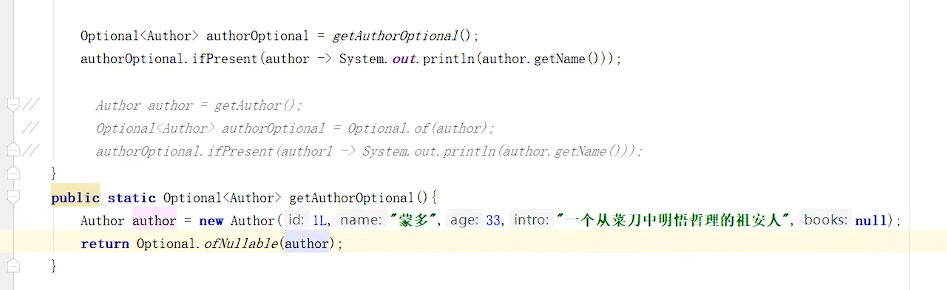
我们获取到一个Optional对象后肯定需要对其中的数据进行使用。这时候我们可以使用其ifPresent方法对来消费其中的值。

这个方法会判断其内封装的数据是否为空,不为空时才会执行具体的消费代码。这样使用起来就更加安全了。

例如,以下写法就优雅的避免了空指针异常。

Optional<Author> authorOptional = Optional.ofNullable(getAuthor());
authorOptional.ifPresent(author -> System.out.println(author.getName()));

image-20251124170044394

3.3 安全获取值

如果我们期望安全的获取值。我们不推荐使用 get 方法,而是使用 Optional 提供的以下方法。

  • orElseGet

    获取数据并且设置数据为空时的默认值。如果数据不为空就能获取到该数据。如果为空则根据你传入的参数来创建对象作为默认值返回。

Optional<Author> authorOptional = Optional.ofNullable(getAuthor());
Author author1 = authorOptional.orElseGet(() -> new Author());
  • orElseThrow

    获取数据,如果数据不为空就能获取到该数据。如果为空则根据你传入的参数来创建异常抛出。

Optional<Author> authorOptional = Optional.ofNullable(getAuthor());
try {
Author author = authorOptional.orElseThrow(() -> new RuntimeException("author为空"));
System.out.println(author.getName());
} catch (Throwable throwable) {
throwable.printStackTrace();
}

3.4 过滤

我们可以使用 filter 方法对数据进行过滤。如果原本是有数据的,但是不符合判断,也会变成一个无数据的 Optional 对象。

Optional<Author> authorOptional = Optional.ofNullable(getAuthor());
authorOptional.filter(author -> author.getAge()>100).ifPresent(author ->
System.out.println(author.getName()));

3.5 判断

我们可以使用 isPresent 方法进行是否存在数据的判断。如果为空返回值为 false,如果不为空,返回值为 true。但是这种方式并不能体现 Optional 的好处,更推荐使用 ifPresent 方法。

Optional<Author> authorOptional = Optional.ofNullable(getAuthor());
if (authorOptional.isPresent()) {
System.out.println(authorOptional.get().getName());
}

3.6 数据转换

Optional 还提供了 map 可以让我们对数据进行转换,并且转换得到的数据也还是被 Optional 包装好的,保证了我们的使用安全。例如我们想获取作家的书籍集合

Optional<Author> authorOptional = Optional.ofNullable(getAuthor());
Optional<List<Book>> books = authorOptional.map(author -> author.getBooks());
books.ifPresent(new Consumer<List<Book>>() {
@Override
public void accept(List<Book> books) {
books.forEach(book -> System.out.println(book.getName()));
}
});

4. 函数式接口

只有一个抽象方法的接口我们称之为函数接口。
JDK的函数式接口都加上了@FunctionalInterface注解进行标识。但是无论是否加上该注解只要接口中只有一个抽象方法,都是函数式接口。

5. 方法引用

我们在使用lambda时,如果方法体中只有一个方法的调用的话(包括构造方法) ,我们可以用方法引用进一步简化代码。

格式

类名::方法名

使用前提:

如果我们在重写方法的时候,方法体中只有一行代码,并且这行代码是调用了第一个参数的成员方法,并且我们把要重写的抽象方法中剩余的所有的参数都按照顺序传入了这个成员方法中,这个时候我们就可以引用类的实例方法。|